OpenClaw costs: Managed vs self-hosted pricing explained
Aug 06, 2026
/
By Alma F.
/
10 min Read
OpenClaw costs range from approximately $6 to $200+ per month, depending on whether you use managed OpenClaw hosting, run it on a self-hosted VPS, or test it locally. OpenClaw itself is open source and free to install, but running it still requires hosting, AI model usage, storage, backups, monitoring, and ongoing maintenance.
For self-hosted OpenClaw, the direct cost usually comes from a VPS and AI tokens. For managed OpenClaw, the monthly cost may include more of the setup, deployment, infrastructure management, and AI usage flow in one place. This makes self-hosting look cheaper on the invoice, while managed hosting can be more cost-effective for beginners, non-technical users, and teams without DevOps time.
The total cost of running OpenClaw depends on server resources, language model selection, automation frequency, hidden maintenance work, and usage monitoring as workflows scale. Most personal users fall in the $6–13 range, small teams typically spend $25–50, mid-sized or scaling teams land in the $50–100 range, and heavy-automation setups can exceed $100 when processing thousands of AI interactions daily.
Is OpenClaw free or paid?
OpenClaw is completely free software. It has no licensing fees, subscription costs, or built-in usage charges. It is released under the MIT license, which allows you to run and modify it without paying for the software itself.
The costs begin when you operate it. OpenClaw requires:
- A server or VPS running continuously
- AI model API calls for every automation step
- Storage for logs, memory, and transcripts
Many users misunderstand open source to mean zero cost. The software is free, but the operational expenses are not.
Those expenses are handled differently depending on the setup. Managed OpenClaw hosting may bundle deployment, infrastructure, and AI usage into one product flow, while self-hosting usually means paying separately for a server, API usage, backups, monitoring, and maintenance.
Managed vs self-hosted OpenClaw costs: what’s the difference?
The main difference between managed and self-hosted OpenClaw costs lies in how expenses are packaged. With self-hosted OpenClaw, you usually pay separately for a VPS, AI model usage, backups, monitoring tools, and the time needed to maintain the setup. With managed OpenClaw hosting, more of the deployment, infrastructure, and usage management is handled within a single product flow.
| Cost factor | Managed OpenClaw hosting | Self-hosted OpenClaw on a VPS |
|---|---|---|
| Software | OpenClaw itself is free and open source | OpenClaw itself is free and open source |
| Hosting | Included in the managed product or plan | Paid separately through VPS or dedicated hosting |
| Setup time | Lower because deployment and server setup are handled | Higher because you manage SSH, Docker, configuration, and deployment |
| AI model usage | May be managed through integrated credits or simplified billing | Usually paid directly to AI providers through API keys |
| Maintenance | Lower server maintenance work | You handle updates, logs, uptime, backups, and troubleshooting |
| Security setup | More infrastructure-level setup is handled by the provider | You handle firewall rules, SSH access, patching, isolation, and recovery |
| Control | Less server-level control | Full root or server-level control |
| Best for | Beginners, non-technical users, and teams that want faster setup | Developers and advanced users who want full control |
Managed OpenClaw can be worth the cost when setup speed, simpler billing, such as the option to use your ChatGPT subscription instead of a separate API key, and lower maintenance work matter more than full server control. This is especially true for beginners, non-technical users, and teams without DevOps time, since a cheap VPS is not always cheaper if it takes hours to configure, troubleshoot, secure, and monitor.
Self-hosting is usually cheaper for technical users who already manage VPS infrastructure, understand Docker-based deployments, and want full control over containers, scripts, networking, and security settings. In that case, the main direct costs are the server and AI tokens, while the operational work is absorbed by the user or team.
Hosting and infrastructure costs
Hosting OpenClaw costs between $5 and $50+ per month for most deployments. The exact cost depends on whether you use managed OpenClaw hosting or run OpenClaw on a self-managed VPS.
OpenClaw needs to stay online continuously. It monitors triggers, processes tasks, and executes workflows around the clock, so local testing is only suitable for experiments. For production use, you need either a managed OpenClaw environment or a VPS with sufficient CPU, RAM, storage, backups, and reliable uptime.
Self-hosted VPS infrastructure costs
Self-hosted OpenClaw infrastructure costs usually come from the VPS plan, backup storage, and any extra monitoring or recovery tools you add. This option gives you more server-level control, but it also makes you responsible for setup, updates, security, uptime, and troubleshooting.
Server specifications directly affect pricing:
- 1–2 vCPU, 2–4 GB RAM → suitable for light personal use
- 2–4 vCPU, 8 GB RAM → stable small-team deployment
- 4+ vCPU, 16 GB RAM → heavy automation or browser workflows
Light personal setups typically run on a basic VPS plan costing $5–10/month. Production environments with higher uptime requirements, better isolation, and additional RAM often range between $15–40/month.
Cost is influenced by:
- Server size. More vCPU cores and higher RAM increase the monthly cost directly.
- Backup frequency. Weekly backups are often included in entry plans, while daily or snapshot-based backups improve recovery options but increase storage and billing.
- Isolation level. Shared VPS plans cost less but share CPU and memory with other tenants, which can cause slowdowns during spikes from neighbors.
- Uptime requirements. Standard uptime is enough for personal projects, while redundancy, failover configurations, and higher availability requirements increase costs.
Self-hosting is usually cheaper when you already manage VPS infrastructure, want full root access, or need custom containers, scripts, integrations, or advanced networking. For example, Hostinger’s OpenClaw VPS option is built for users who want a one-click OpenClaw installation on a VPS with root access and allocated resources.
Managed OpenClaw infrastructure costs
Managed OpenClaw infrastructure costs are packaged differently. Instead of paying only for server resources, you pay for a managed product that includes more of the setup and operational layer, such as deployment, infrastructure management, security setup, updates, backups, and easier access to AI features.
Managed OpenClaw can be cheaper in practice when it saves setup and maintenance time. A low-cost VPS is not always the lowest-cost option if it takes hours to configure, breaks after an update, or requires ongoing security checks. Managed hosting is usually a better fit for beginners, non-technical users, and teams without DevOps time, as it reduces the workload of managing Docker, SSH, ports, server configuration, monitoring, and recovery.
The trade-off is control. Managed OpenClaw reduces maintenance, but self-hosted OpenClaw offers greater control over the server environment. Before choosing a managed setup, check what is included in the plan, including resource limits, backup options, AI credit terms, upgrade paths, and whether advanced CLI or customization options are available.
For step-by-step setup instructions for both options, follow our guide to setting up OpenClaw.
AI model and token usage costs
AI model usage is the highest variable cost of running OpenClaw. Most users spend between $1 and $150 per month on tokens, depending on model selection and workflow intensity.
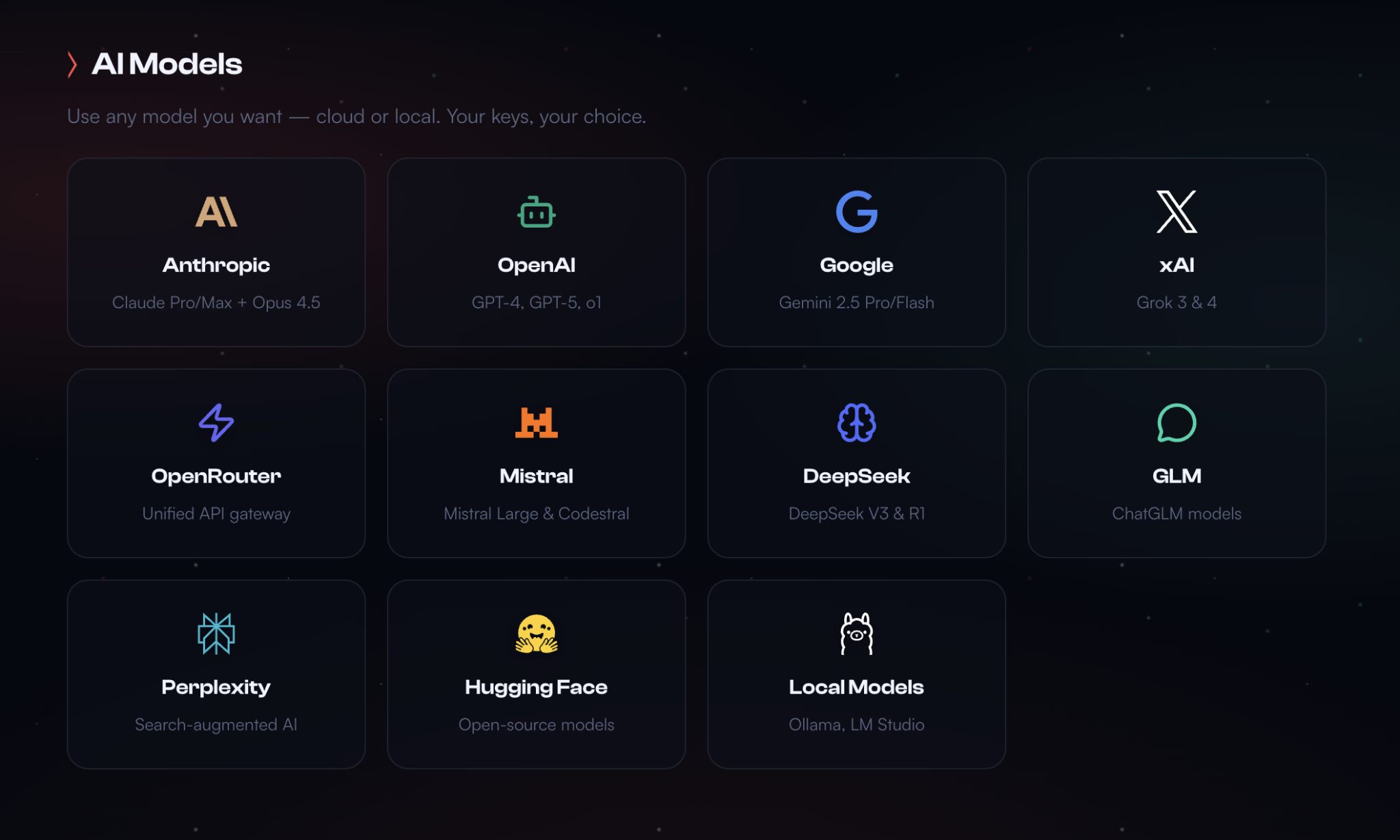
OpenClaw doesn’t include its own AI model. It connects to external language models from providers such as OpenAI, Anthropic, and Google.
Every conversation, automation step, and decision OpenClaw makes triggers an API call to one of these models. That call consumes tokens.
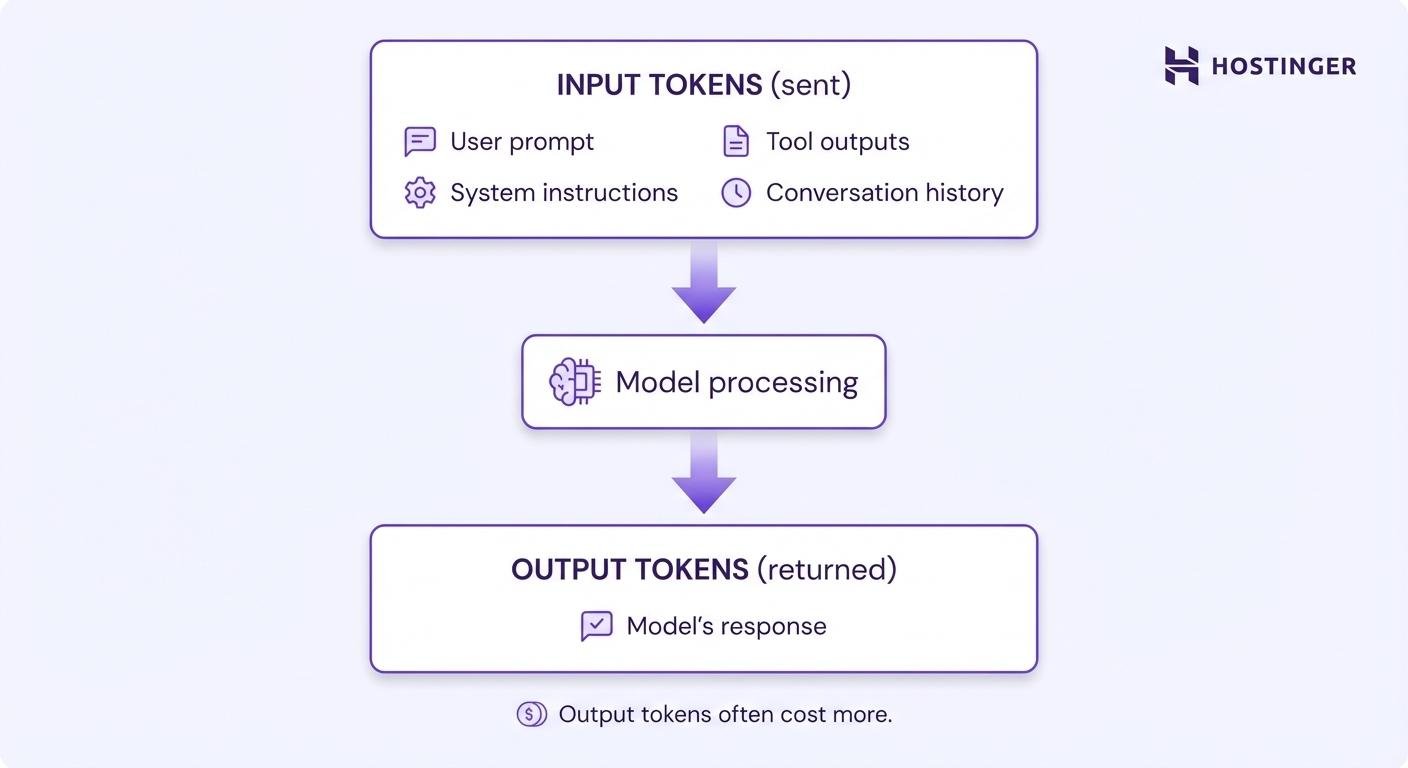
Tokens represent pieces of text. You pay separately for:
- Input tokens. Your prompt and context
- Output tokens. The model’s response
Output tokens usually cost 2–5× more than input tokens.
Here’s what current token pricing looks like for popular models:
Budget models (great for routine tasks):
- GPT-4o-mini → $0.15 input and $0.60 output per million tokens
- Llama 3.1 8B → $0.05 input / $0.08 output per million tokens
Mid-tier models (balanced cost and performance):
- Claude Haiku 4.5 → $1.00 input / $5.00 output per million tokens
- GPT-4o → $2.50 input / $10.00 output per million tokens
Premium models (complex reasoning):
- Claude Opus 4.5 → $5.00 input / $25.00 output per million tokens
A typical OpenClaw interaction uses roughly 1,000 input tokens and 500 output tokens. That single call costs about $0.00045 with GPT-4o-mini or $0.0075 with GPT-4o.
Multiply by your usage frequency: 1,000 interactions per month runs $0.45 with the budget model versus $7.50 with the premium one.
Low-usage experiments–testing OpenClaw with a few dozen messages per week, running simple automations occasionally–cost under $1/month in tokens. Heavy automation scenarios with thousands of multi-step workflows, browser sessions, and complex reasoning can easily hit $50–150/month in API costs alone.
Managed OpenClaw can simplify AI billing if usage is handled through integrated credits or a single dashboard, but it does not eliminate token costs. The same workflow still costs more or less, depending on the model, prompt length, output size, and number of automation steps. For self-hosted OpenClaw, token usage is usually billed directly by the AI provider through your API key.
Model choice has a greater impact on cost than server size. Routing simple tasks to smaller models, optimizing prompts, and reducing unnecessary API calls significantly lowers AI spending without sacrificing quality for routine operations.
How automation scope affects costs
Automation scope directly increases token usage and resource consumption because the more tasks you automate, the more AI calls OpenClaw makes, and the faster costs accumulate.
Each workflow trigger, step in a multi-step automation, and tool invocation can fire an API request.
High-cost patterns include:
- Browser automation sessions
- Parallel task execution
- Batch document processing
- Multi-agent orchestration
- Large-context retrieval workflows
Browser automation hits especially hard. While OpenClaw’s architecture documentation explains that the system reduces token usage by roughly 90% by parsing accessibility trees rather than sending screenshots, navigation still requires repeated model decisions.
File operations and parallel runs compound costs, too. If you set up OpenClaw to process batches of documents, generate multiple reports simultaneously, or monitor several messaging platforms at once, you’re multiplying the base cost by the number of parallel workflows.
Cost risk appears when workflows scale from testing to production. A task that triggers 10 times per day in testing may trigger 500 times per day once connected to live inputs.
Managed OpenClaw hosting can simplify the infrastructure side of automation, but it does not stop AI usage from growing as workflows expand. Whether you use managed hosting or a self-hosted VPS, monitor automation triggers, model choice, token usage, and repeated tool calls before moving workflows from testing to production.
Start small, monitor costs daily for the first week, then scale gradually. Reviewing common OpenClaw use cases helps you estimate which automation patterns fit your budget and business needs.
Development vs production environment costs
Running separate development and production environments roughly doubles your infrastructure costs, adding another $5–20/month for a test VPS plus the AI tokens consumed during development and debugging. This cost applies mostly to self-hosted OpenClaw setups and advanced production users who need isolated environments before changing live workflows.
However, separate environments provide:
- Safer testing of workflow changes
- Reduced risk of production disruption
- Protection of live credentials and data
- Model cost testing before scaling
Skipping a development environment reduces costs but increases operational risk, so you’ll need a second server to test changes before pushing them live.
If a misconfigured automation calls GPT-4 5,000 times instead of 50, you’d rather catch that in a dev environment with budget models than in production with premium ones. The safety is worth the added cost for anything business-critical.
The common trade-off is that solo developers and small projects often skip separate environments to save money, accepting the risk of breaking their production setup during updates.
Managed OpenClaw users may not need a separate test VPS, especially for simple setups. In managed environments, testing costs are more likely to appear as extra AI credit usage, upgrade needs, or resource limits reached during workflow experiments.
A middle-ground approach uses production hardware but switches to cheaper AI models for testing.
Additionally, isolating test environments helps prevent accidental exposure of production credentials, real customer data, or live integrations during development.
Typical OpenClaw cost scenarios
With a cost‑optimized setup, OpenClaw costs $6–13/month for personal projects, $25–50/month for small business workflows, $50–100/month for scaling teams, and $100–200+/month for heavy operations, depending on usage patterns and model selection.
Here’s what scenarios look like with current pricing:
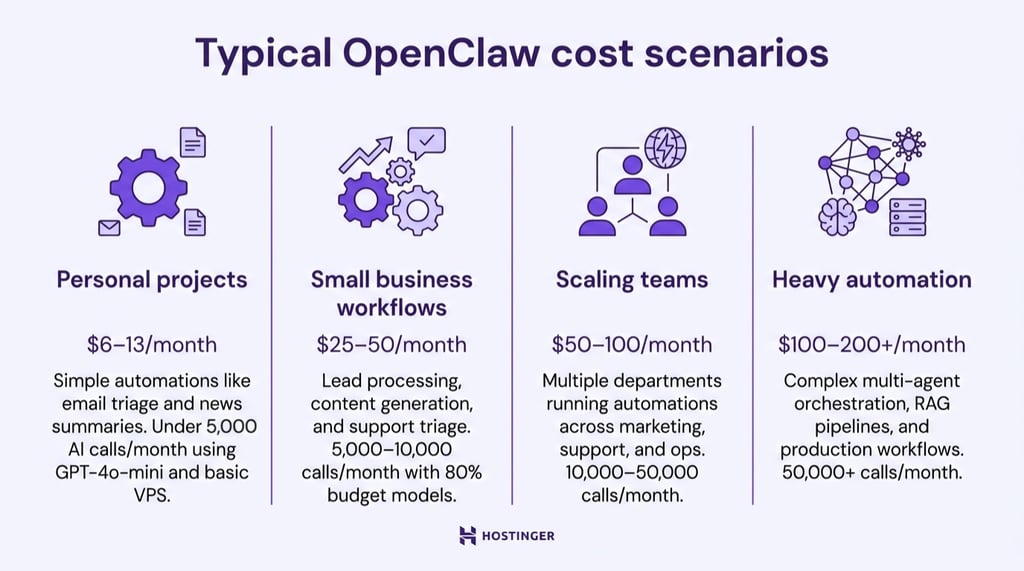
Personal projects (under 5,000 AI calls/month)
You’re running simple automations–email triage, daily news summaries, occasional web research. With GPT-4o-mini as your primary model and a basic VPS, you’ll spend roughly $6–13/month total.
That breaks down to $6.99/month for Hostinger KVM 1 hosting, plus $1–6 in AI tokens depending on usage intensity. This is cheaper than a single Zapier Professional subscription.
Small business workflows (5,000–10,000 calls/month)
You’re running lead processing, content generation, CRM syncing, and customer support triage across a small team. Using a mix of 80% budget models and 20% mid-tier models for complex tasks, expect $25–50/month.
Most of that cost comes from AI tokens ($15–35), with server costs around $7–15 depending on performance needs.
Scaling teams (10,000–50,000 calls/month)
You’re running multiple departments on OpenClaw–marketing, support, internal ops–with several automations per team and regular browser steps. With a mix of 60–80% budget models and 20–40% mid‑tier models, monthly costs land in the $50–100 range.
Most of that comes from AI tokens ($35–80), with infrastructure in the $10–20 range for 2–4 vCPU servers and 8–16 GB RAM.
Heavy automation (50,000+ calls/month)
You’re running complex multi-agent orchestration, RAG pipelines, extensive browser automation, and production workflows. Heavy usage requires 4–8 vCPU servers with 16+ GB RAM. Your monthly bill runs $100–200+, with $80–150 in AI costs and $15–25 in infrastructure.
Strategic model routing (using budget models for routine tasks, premium models only when needed) keeps this manageable.
The variability comes from model choice more than anything else. Switching from GPT-4o to GPT-4o-mini for 80% of your calls can cut costs by 60–80%, with minimal impact on quality for simple tasks.
Hidden and often overlooked OpenClaw costs
Hidden or often overlooked costs for OpenClaw include backups, storage growth, monitoring tools, and idle automations that silently drain your budget. These expenses sneak up on people because they’re easy to miss during initial setup:
- Backups ($0–6/month). OpenClaw stores conversation history, memory files, and configuration that you can’t afford to lose. Hostinger includes free weekly backups, but daily backups cost $6/month.
- Storage growth ($2–5/month). OpenClaw writes JSONL transcripts and Markdown memory files that accumulate over months. Block storage runs about $0.10/GB/month at most providers. An active deployment might accumulate 20–50 GB of logs and memory over six months, adding $2–5/month you didn’t budget for.
- Monitoring tools ($0–15/month). Free options include Grafana Cloud (10,000 metrics free), Uptime Robot (50 monitors free), and Netdata (self-hosted). Paid options like Datadog start around $15/host/month. Most OpenClaw users get by on free monitoring until they hit scale.
- Idle automations (10–30% of AI spend) – That test automation you set up three months ago and forgot about? It’s still calling APIs. A GitHub discussion on controlling OpenClaw costs shows that unused automations and forgotten test workflows commonly account for 10–30% of monthly AI spend.
How to keep OpenClaw costs under control
OpenClaw costs remain predictable when you monitor usage, choose the right models, and expand automation gradually. The best cost-control strategy depends on whether you run OpenClaw on a self-hosted VPS or use managed OpenClaw hosting.
Practical strategies include:
- Route tasks to budget models. Use smaller, low-cost models for classification, extraction, and short summaries, and reserve premium models for complex reasoning. Tiered routing can reduce API spend by 60–80%.
- Monitor token usage weekly, not monthly. Set hard spending limits and enable budget alerts at 50%, 75%, and 90% thresholds to catch spikes early.
- Enable prompt caching. Caching reduces repeated input token costs when the same instructions are reused, with some models discounting cached input tokens by up to 90% within short time windows.
- Scale gradually. Add one workflow at a time, monitor costs for a week, confirm they align with expectations, then expand.
For self-hosted OpenClaw, choose the right VPS size before adding more workflows. Use budget models for routine tasks, set provider-level token limits, and create separate API keys per workflow to track cost attribution. Review logs regularly, delete unused automations, and schedule backups based on recovery risk rather than habit. This keeps server costs, token usage, and storage growth easier to control.
For managed OpenClaw, track AI credit usage from the start. Begin with one or two low-risk automations, avoid connecting every channel at once, and review usage after the first week. Upgrade only when active workflows need more resources, and use CLI or advanced configuration options only when the setup requires deeper customization.
Using integrated AI credits can also centralize billing. Instead of managing multiple external API keys and provider invoices, Hostinger bundles Nexos AI credits directly with OpenClaw, making usage tracking and cost forecasting more predictable from one dashboard.
Hostinger’s managed OpenClaw setup lets you deploy autonomous AI agents quickly, switch between Claude, ChatGPT, and Gemini without redeploying or reconfiguring API keys, and manage both infrastructure and AI usage from a single dashboard. More advanced users who prefer managing their own API keys can still do so because OpenClaw’s configuration file supports 20+ providers.
Following OpenClaw best practices helps keep recurring costs predictable as your workflows, integrations, and AI usage grow.
All of the tutorial content on this website is subject to Hostinger's rigorous editorial standards and values.

Alma is an AI Content Editor with 9+ years of experience helping ideas take shape across SEO, marketing, and content. She loves working with words, structure, and strategy to make content both useful and enjoyable to read. Off the clock, she can be found gaming, drawing, or diving into her latest D&D adventure.