Automatic WordPress updates in Hostinger dashboard keep WordPress core, themes, and plugins up to date based on the rules you set. By default, WordPress only auto-updates minor core versions, so enable Smart auto-updates in the Updates section to also update themes and plugins automatically.
NOTES
- Automatic backups are taken prior to automatic updates so that you can restore a previous version anytime
- Automatic WordPress Updates is not available on Agency Hosting plans.
Enable automatic WordPress updates
In the Websites section, locate the WordPress website in question and click on Dashboard. Then, search for WordPress → Updates and open it.
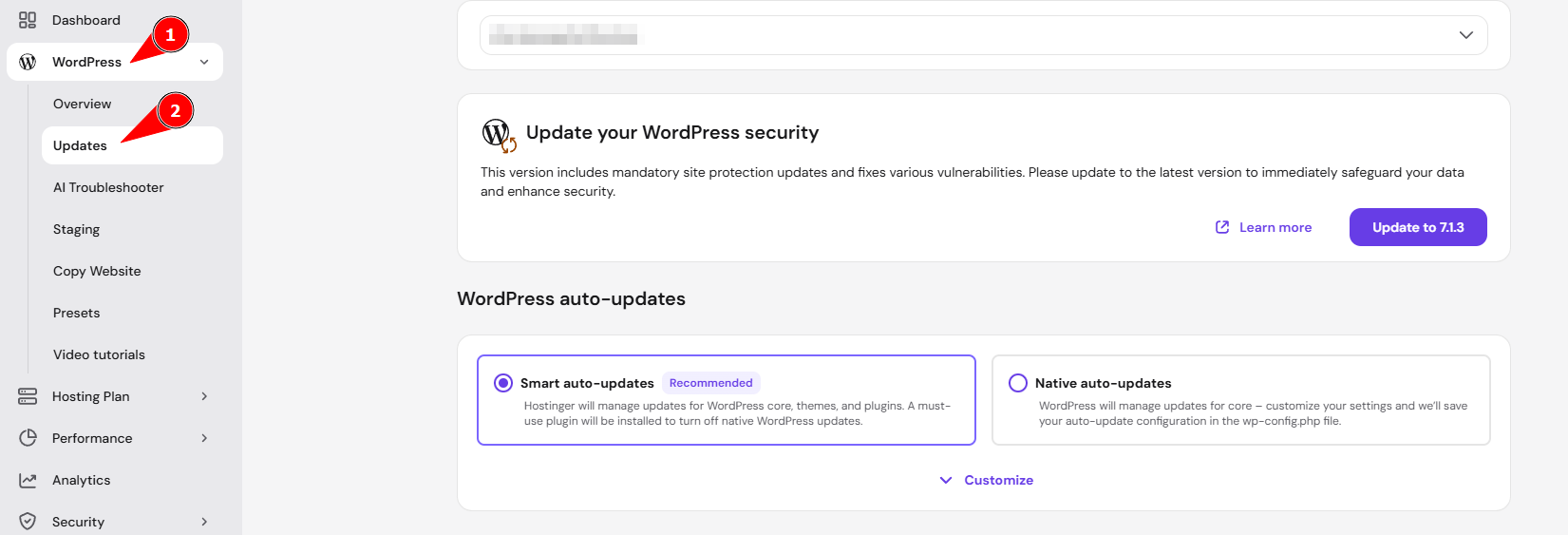
In the section WordPress auto-updates, click on Smart auto-updates.

Please read the disclaimer to learn about the benefits and risks of automated updates, and then click on Save to confirm.
When enabling automatic WordPress updates in Hostinger dashboard, native WordPress automatic updates are disabled.
Advanced settings
Click on Customize to differentiate the logic for WordPress core, plugins, and themes.

For the WordPress core, the available options are:
-
Don’t update: with this option, the automatic updates are disabled.
-
Yes, but only security updates: this will only apply minor version updates (i.e., from 6.2.1 to 6.2.2).
-
Yes, enable all updates: this will apply both major and minor updates (i.e. from 6.2.1 to 6.3).
Similarly, for themes and plugins, the available options are:
-
Don’t update: with this option, the automatic updates are disabled.
-
Yes, but only security updates: this will apply updates that fix known vulnerabilities (based on the Patchstack vulnerability database).
-
Yes, enable all updates: this will apply all updates.
Troubleshoot
In case of any issues, it’s recommended to disable automatic WordPress updates in Hostinger dashboard → WordPress → Updates.
If your website breaks down due to automatic updates, restore a backup.
With automatic WordPress updates enabled, Hostinger updates your WordPress core, themes, and plugins based on your chosen settings and takes a backup before each update.