What is Paperclip AI? How it works and key features explained
Aug 29, 2026
/
By Ksenija
/
12 min Read
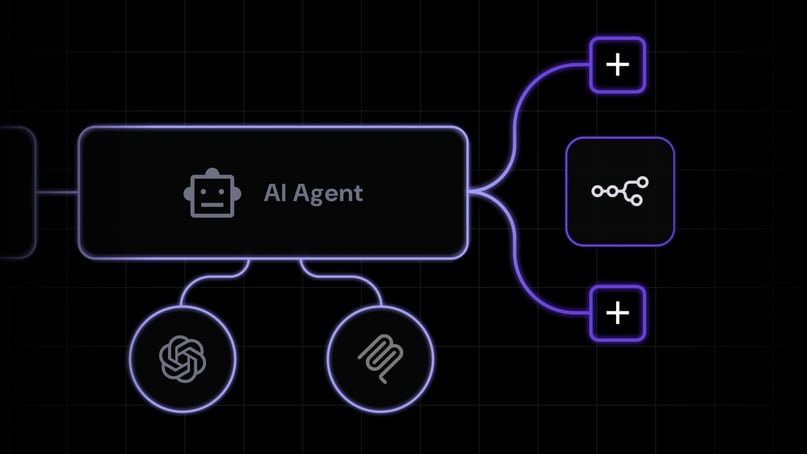
Paperclip AI is an open-source orchestration platform for managing teams of AI agents that work toward shared business goals. It acts as a control layer that organizes agents into roles and hierarchies, assigns and tracks tasks, and monitors progress, budgets, and decisions from one system.
Rather than running every AI agent itself, Paperclip connects to external agent runtimes through adapters. These agents can execute assigned work, report results back to Paperclip, and continue operating through scheduled or event-triggered workflows.
This structure distinguishes Paperclip from general AI assistants, which typically respond to individual prompts, and lower-level agent frameworks that require developers to build more of the coordination logic themselves.
In this guide, you’ll learn how Paperclip AI works, its core features and use cases, how much it costs to run, its main limitations, and how to get started with a self-hosted deployment.
Paperclip AI explained and key characteristics
Paperclip is an open-source platform for organizing and managing teams of AI agents around shared business goals.
It acts as a central control system that defines agent roles, reporting relationships, tasks, budgets, and progress, while external agent runtimes perform the assigned work through configured adapters.
For example, you can define a goal such as launching a new product, assign marketing, development, and operations roles to different agents, and use Paperclip to coordinate tasks, track execution, and review progress within a single system.
In this article, Paperclip AI refers to the open-source AI agent orchestration platform available at paperclip.ing and maintained in the official Paperclip GitHub repository, rather than other products or companies that use the Paperclip name.
Key characteristics of Paperclip
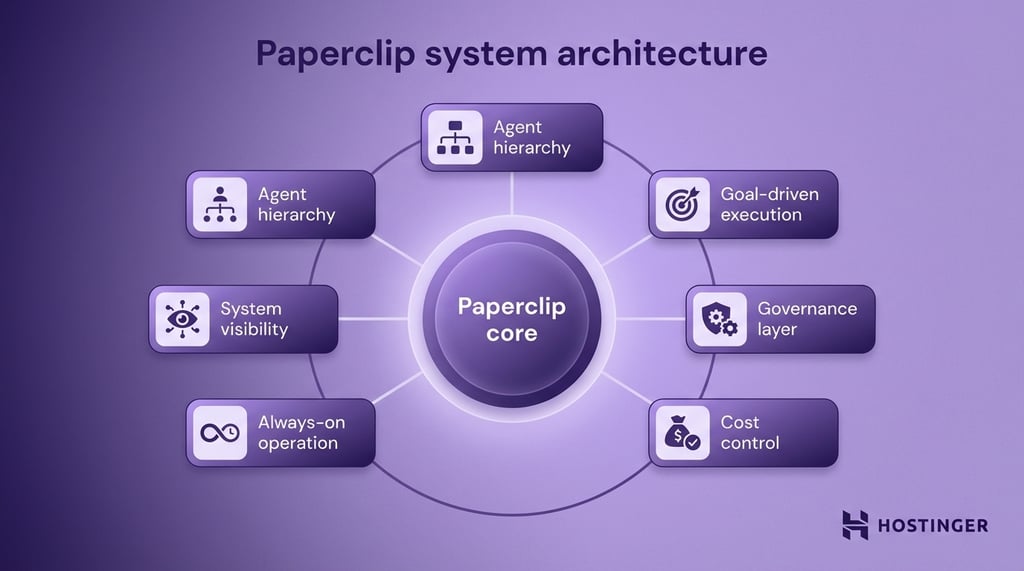
Paperclip’s key characteristics are its structured agent hierarchy, goal-driven task management, built-in governance, budget controls, event- or schedule-triggered agent execution, and centralized visibility.
Organizational structure
Paperclip uses a company-like hierarchy. Each agent has a defined role, reports to others, and works within a structured system where tasks are assigned, tracked, and passed between agents.
Decisions can move up for approval or down for execution, keeping work coordinated.
Goal-driven execution
Every task in Paperclip is tied to a larger objective. Agents work toward defined goals, such as launching a product or increasing revenue, and their progress is tracked at the company level.
Built-in governance
Control mechanisms keep the system from running unchecked. You act as the “board,” approving major decisions while agents operate within defined limits.
Agents cannot expand their roles or change strategy without approval, and every action is logged and traceable.
Cost and budget control
Spending is managed by setting clear limits per agent or department. Once an agent reaches its budget, it pauses automatically. This keeps API usage predictable and prevents unexpected costs.
Triggered agent execution
Paperclip can invoke agents on a schedule or in response to workflow events, such as a new task assignment or manual trigger. Each execution runs through the agent’s configured adapter and external runtime, then reports its results and status back to Paperclip.
Full visibility through a dashboard
All activity is tracked in a central dashboard. The full organizational structure is visible, tasks move through a ticket system, and progress and decisions can be reviewed as they happen.
Paperclip AI vs AI assistants
Paperclip AI manages systems of agents, while AI assistants execute individual tasks.
AI assistants like ChatGPT and Claude focus on helping you complete one task at a time. You give a prompt, they respond, and the interaction ends there.
Paperclip works at a different level. Instead of helping you do tasks, it organizes multiple agents to run ongoing processes toward a goal.
With an AI assistant, you stay in control of every step. You ask for code, review it, deploy it, then move to the next task. The assistant helps, but you are still doing the coordination.
With Paperclip, you define the goal once, and the system handles coordination. Agents take on roles, delegate work, and report progress without constant input.
Aspect | AI assistants | Paperclip AI |
Scope of work | One task at a time | Multi-step workflows across agents |
Interaction style | Prompt → response | Goal → system execution |
User involvement | High (you guide each step) | Lower (system coordinates work) |
Workflow | Manual and sequential | Structured and ongoing |
Best use case | Writing, debugging, quick tasks | Running processes like product launches |
Paperclip AI vs OpenClaw
Paperclip AI manages multiple agents as a system, while OpenClaw is a single agent that executes tasks for you.
OpenClaw works like a hands-on assistant. You give it instructions through chat, and it carries them out on your machine, such as running commands, editing files, or browsing. It focuses on completing one task at a time and relies on your input to move forward.
Paperclip takes a broader role. Instead of executing tasks directly, it organizes multiple agents into a structured setup with roles, responsibilities, and shared goals. It coordinates how work gets done across those agents without constant input from you.
With OpenClaw, you stay in the loop. You decide what to do next, send the instruction, and review the result. It is direct and flexible, but you are responsible for managing the flow.
With Paperclip, you step back and define how the system should operate. Agents take on roles, pick up tasks, and report progress based on that structure.
Aspect | OpenClaw | Paperclip AI |
Role | Task executor | System manager |
Agent model | Single agent | Multiple coordinated agents |
Interaction | Chat-based commands | Structured org and task system |
Control flow | User-driven step-by-step | System-driven after setup |
Typical use | Run commands, automate local tasks | Coordinate complex workflows |
For example, if you want to automate file cleanup or run a command, OpenClaw can do that immediately. If you want to run a full workflow, such as building, testing, and updating a product across multiple steps, Paperclip can organize agents to handle each step.
Paperclip AI vs AI agent frameworks
Paperclip AI is a ready-to-use system for running multiple agents, while AI agent frameworks are tools for building those systems from scratch.
AI agent frameworks like LangChain or AutoGen give you the building blocks to create agents, define workflows, and connect tools.
They are flexible, but you have to design everything yourself, including how agents communicate, how tasks are tracked, and how decisions are controlled.
Paperclip already includes a structure out of the box. You create an organization with roles, goals, and reporting lines, and the system handles how agents coordinate work within that setup.
Aspect | AI agent frameworks | Paperclip AI |
Setup | Build everything yourself | Ready-to-use structure |
Flexibility | Full control | Structured environment |
Agent coordination | You design it | Built-in org system |
Tracking and logging | Custom implementation | Built-in (tickets, history) |
Time to value | Slower (setup required) | Faster (works out of the box) |
Best use case | Custom systems and experimentation | Running agent teams quickly |
For example, if you want a team of agents to manage a product launch, a framework requires you to design how those agents will communicate with each other and track progress. Paperclip already provides that structure through its org chart, ticketing system, and shared context.
How paperclip AI works
Paperclip works as a control plane that coordinates AI agents, tasks, budgets, and organizational structure from one system. Instead of running continuously, agents execute in short work sessions called heartbeats.
A heartbeat starts when an agent is triggered by a schedule, task assignment, manual request, or automation. Paperclip then invokes the agent’s configured adapter, which connects the control plane to an external runtime such as Claude Code, OpenAI Codex, Gemini CLI, or another supported agent system.
During the heartbeat, the external runtime receives the relevant task and company context, performs the work, and returns the results to Paperclip. Paperclip records the agent’s status, logs, usage, costs, and session state so users can track progress and manage subsequent work from the same interface.
This architecture separates orchestration from execution: Paperclip manages when and why agents work, while adapters determine how each connected runtime starts, receives context, and reports its output.
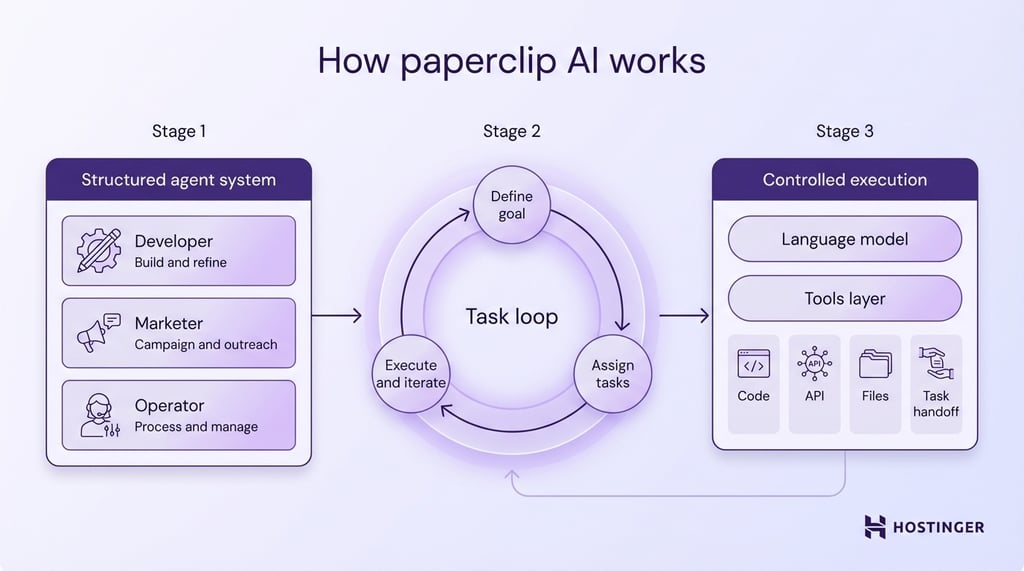
Once the system is set up, Paperclip runs a loop.
At regular intervals, each agent:
- Checks if it has any assigned tasks
- Reads the task context (goal, previous work, instructions)
- Decides what to do next using the model
- Takes an action (for example, writes code or creates a new task)
- Logs the result
Tasks move through the system using a ticketing model. One agent can create a task and assign it to another.
A “product lead” agent creates a task, such as “build login system,” and assigns it to a “developer” agent. When the developer finishes, it updates the task or creates follow-up tasks.
All of this is tracked in a shared system. Every action, decision, and output is logged.
Because agents act independently, Paperclip needs clear limits on what they are allowed to do. Control is built into the system through rules.
You can set budgets to limit the number of API calls an agent can make, restrict which tools it can use, and require approval for certain actions, such as creating new agents or changing the workflow.
If an agent hits a limit, it stops. If it needs approval, it pauses and requests it.
Core features of Paperclip AI
Paperclip AI is built around six core capabilities: agent orchestration, organizational hierarchy, goal and task management, runtime skill injection, governance and budget controls, and an open-source architecture.
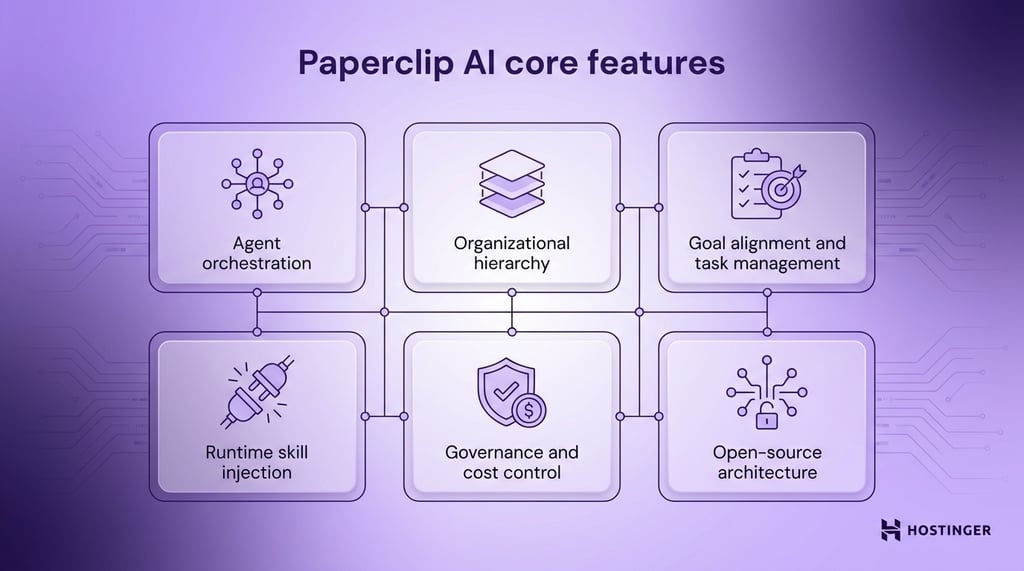
Together, these capabilities enable Paperclip to coordinate external AI agents as a structured system while giving users visibility into how tasks, decisions, costs, and responsibilities flow across the organization.
Agent orchestration
Agent orchestration is how Paperclip coordinates multiple AI agents around shared tasks and goals. It manages which agent receives a task, when that agent should be invoked, and how work moves between agents through the organization.
Paperclip handles this coordination through its task system, agent hierarchy, triggers, and configured adapters, while the connected external runtimes perform the actual execution.
Organizational hierarchy and company modeling
Paperclip organizes agents into a company structure with defined roles, reporting relationships, goals, budgets, and responsibilities.
Each agent has a specific role and reports to one manager, except for the CEO at the top of the hierarchy. This reporting structure helps Paperclip determine how work is delegated, escalated, and reviewed across the organization.
For example, a Paperclip company can include a CEO agent that sets strategy, a CTO that manages engineering work, and marketing or development agents that handle specialized tasks. The org chart gives each agent a clear place in the company while keeping responsibilities and delegation paths visible.
Goal alignment and task management
Paperclip connects agent work to company goals through a hierarchy of tasks, called issues. Each issue can include a title, description, priority, status, assignee, parent issue, and project, helping agents understand both what they need to do and why the work matters.
Tasks can be broken into parent and child issues, creating a traceable path from individual actions back to the company goal. Agents can receive assignments, update task status, add comments, and create follow-up work as the workflow progresses.
For example, a company goal such as “reach 1,000 users” can lead to a parent task for launching a growth campaign, with child tasks assigned to marketing, content, and analytics agents.
Runtime skill injection
Runtime skill injection lets Paperclip make selected skills available to an agent when its configured runtime starts. Skills are reusable instructions or capabilities that help an agent perform specific types of work, such as interacting with a codebase, following a workflow, or using supported tools.
Paperclip manages which skills are assigned to an agent, while the adapter synchronizes or exposes those skills to the connected runtime during execution. The exact delivery method depends on the adapter and runtime. For example, an adapter can make skills available through a temporary directory, a runtime configuration path, or another supported integration method.
This approach lets you give agents the capabilities they need without permanently adding every available skill to every runtime configuration.
Governance and cost control
Paperclip uses governance and budget controls to limit how agents operate within a company. You can assign spending limits, define reporting relationships, and require approval for selected organizational changes or actions.
Budget controls help track and restrict agent spending, which is especially important when external runtimes or model APIs generate usage costs. When an agent reaches its configured budget limit, Paperclip can prevent additional execution until the limit is adjusted.
Governance rules also help control how agents interact with the organization. For example, higher-impact actions such as hiring new agents or changing parts of the company structure can require approval, giving human operators oversight over decisions that affect the wider system.
Open-source architecture and tech stack
Paperclip is an open-source application built around a Node.js server and a React interface. You can run it locally or self-host it on a server or VPS, depending on whether you need a personal development environment or an instance that is accessible to a wider team.
For local use, Paperclip requires Node.js 20 or later and can run with an embedded PostgreSQL database, so it does not require a separate external database for a basic setup. Server deployments can use the same application stack behind a custom domain and HTTPS.
Because the source code is publicly available, developers can inspect, modify, and extend Paperclip or integrate it with their own agent runtimes and infrastructure.
Paperclip AI use cases
The most common Paperclip AI use cases include autonomous product development teams, AI-driven marketing teams, and end-to-end business automation, where tasks are planned, executed, and tracked across multiple agents.
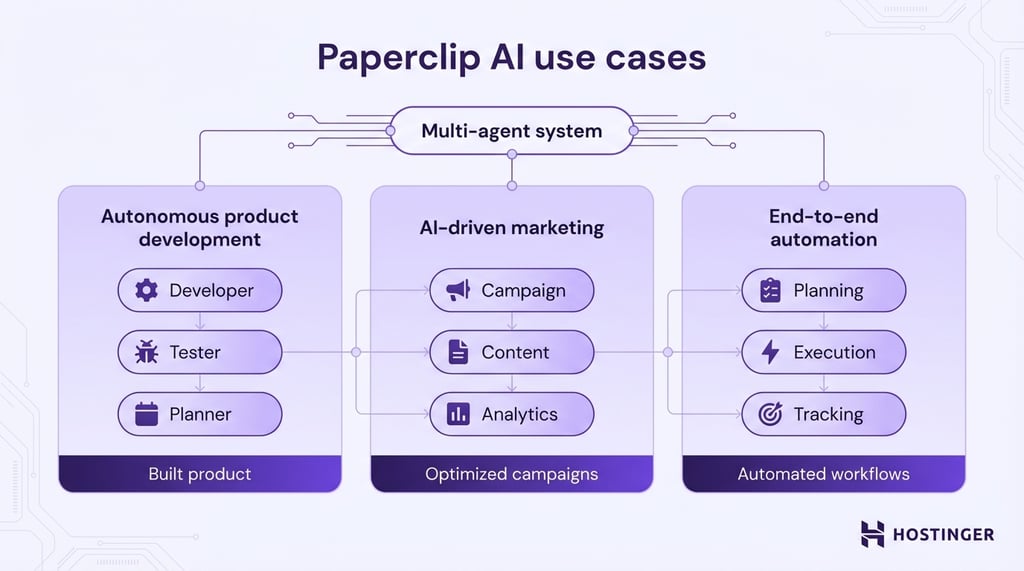
Autonomous product development teams
Paperclip can coordinate AI agents involved in product development by organizing work around a shared goal and assigning tasks across specialized roles.
For example, a goal such as “launch a simple SaaS tool” can be divided into issues for interface design, backend development, authentication, testing, and deployment. Paperclip tracks these tasks, assigns them to the appropriate agents, and records progress as the connected agent runtimes complete the work.
AI-driven marketing teams
Paperclip can coordinate marketing agents around goals such as launching a campaign or promoting a new product. The company structure can divide the work into planning, content creation, SEO, distribution, and performance-tracking tasks.
Paperclip assigns and tracks these tasks, while connected agents and tools perform the actual work, such as drafting content, preparing campaign assets, or updating analytics. This lets teams manage a multi-step marketing workflow within a single organizational system without implying that Paperclip itself publishes or distributes the content.
End-to-end business automation
Paperclip can coordinate multi-step business workflows when its agents are connected to the tools and services required to perform each task.
For example, a lead-management workflow can assign separate tasks for qualifying a lead, preparing a follow-up message, updating a CRM, and reviewing conversion data. Paperclip tracks how those tasks move between agents, while the connected runtimes and integrations perform the actions.
The same model can support customer service workflows, where agents categorize requests, prepare responses, create follow-up tasks, or escalate issues for human review.
Is Paperclip AI free?
Paperclip AI is free to download and self-host because the software is open source under the MIT License. You do not need a Paperclip account to run the self-hosted version.
However, using Paperclip is not always cost-free. You may still pay for the infrastructure that hosts the application and for the external AI models or runtimes used by your agents. For example, agents connected to providers such as Anthropic or OpenAI generate API usage costs when they execute tasks.
Paperclip tracks model usage and costs for each agent and lets you set company-level or per-agent budget limits to control spending.
How much does Paperclip AI cost to run?
There is no single fixed cost for running Paperclip. Your total expense depends on two main factors: hosting infrastructure and AI-model usage.
A self-hosted Paperclip instance can run on a relatively small VPS, while model costs vary by provider, model, number of agents, and how often they execute tasks. Each agent heartbeat can generate model usage, so frequent or complex workflows generally cost more than occasional, lightweight tasks.
Paperclip records cost events from connected agents and can enforce monthly budgets at the company or individual-agent level. This makes it easier to monitor spending as your agent organization grows.
What are some common challenges and limitations of Paperclip AI?
As you move from simple tasks to full workflows, you need to manage structure, costs, and control more carefully. What works in a small setup can become harder to manage as the system grows.
The most common challenges include system complexity and setup, cost and infrastructure requirements, and control, safety, and reliability risks.
System complexity and setup
System complexity and setup are challenging because you need to define roles, set goals, connect tools, and make sure everything Paperclip requires careful setup because you need to define company goals, agent roles, reporting relationships, task flows, adapters, and the external runtimes each agent uses.
For example, a product workflow may require you to:
- Decide which agents you need, such as a developer, marketer, and manager
- Define each agent’s responsibilities and reporting line
- Organize how tasks move between agents
- Configure the adapters and runtimes that execute the assigned work
Unclear roles or task ownership can lead to duplicated work, missed issues, or stalled workflows. Setup also requires testing how agents behave, how tasks are delegated, and how external runtimes respond before you rely on the system for ongoing work.
The complexity increases as you add more agents, workflows, and runtime integrations because there are more dependencies and interactions to manage.
Cost and infrastructure requirements
The main cost comes from API usage. Each agent relies on a language model, and every action it takes uses tokens. If you run multiple agents at the same time, those costs add up quickly.
For instance, a single agent writing content occasionally is cheap. But a team of agents planning, writing, reviewing, and tracking tasks throughout the day can generate hundreds or thousands of API calls.
Infrastructure also matters. Paperclip needs a stable environment to run 24/7. This usually means using a VPS or cloud server instead of your local machine.
If you run it locally, the system stops when your computer is off. On a server, it keeps running, processing tasks, and staying in sync.
If you want that setup without having to manage everything from scratch, a VPS (Virtual Private Server) is a practical option.
For example, Hostinger’s Paperclip VPS gives you dedicated resources, full control over your environment, and the ability to run long-running processes like Paperclip without interruptions.
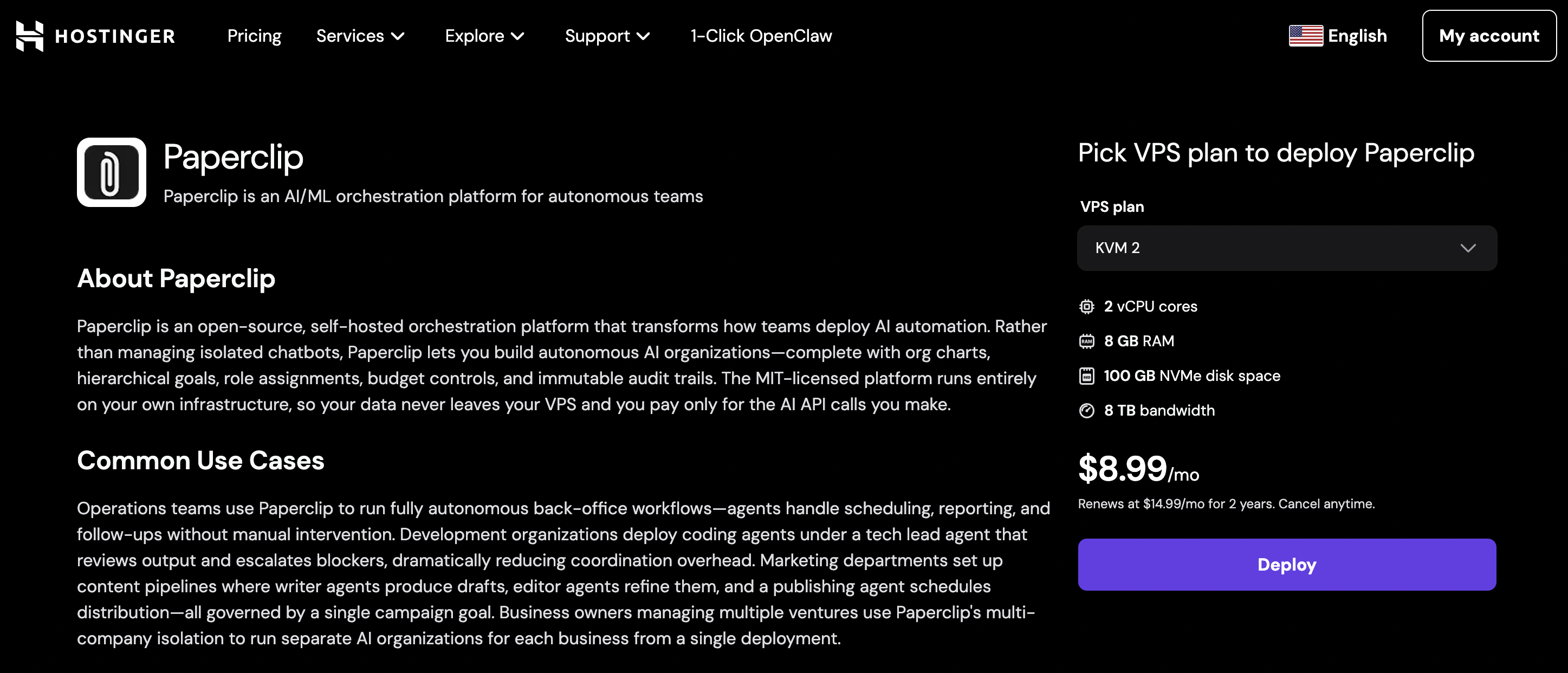
You can configure your server, manage API access, and keep your system running continuously without relying on your local machine.
This makes it easier to keep agents active, store task history, and maintain stable performance as your setup grows.
Control, safety, and reliability risks
Paperclip coordinates autonomous agent workflows, but the connected runtimes can still misunderstand tasks, generate incorrect outputs, or fail during execution. When later tasks depend on those results, one error can propagate through the workflow.
Permissions also need careful management. The tools, files, APIs, and external systems available to an agent are often controlled by its runtime environment and adapter configuration rather than Paperclip alone. Give each agent only the access required for its role and use Paperclip’s approval and governance controls for higher-impact organizational actions.
Reliability also depends on external components such as model providers, APIs, runtimes, and integrations. If one dependency becomes unavailable or returns incorrect data, an agent may fail to complete its task or produce incomplete results.
Human review remains important for workflows involving production code, sensitive data, financial decisions, or other actions where an incorrect result could have a significant impact.
How to get started with Paperclip AI
To get started with Paperclip AI, first choose where to run the application, connect at least one supported agent runtime, and create a simple company structure for testing.
You can run Paperclip locally while experimenting with the platform. For a persistent deployment that remains available independently of your computer, you can set up Paperclip on a VPS and configure the server environment for ongoing use.
Once Paperclip is running, create a small company structure with clearly defined agent roles and reporting relationships. For example, you might use one agent to coordinate work, another to handle execution, and a third to review results. Starting with a small organization makes it easier to test agent behavior and runtime configuration before adding more roles.
Next, define a clear company goal and create a few initial tasks. A content workflow, for example, might include separate tasks for outlining an article, drafting it, and reviewing the final output.
Monitor how agents receive assignments, complete work through their connected runtimes, update task status, and hand work to other agents. If tasks stall or outputs are inconsistent, refine the agent roles, instructions, reporting structure, or runtime configuration.
Once the workflow behaves as expected, gradually add more agents, tasks, and integrations. Expanding the organization incrementally makes it easier to identify problems with delegation, costs, or agent behavior before they affect larger workflows.
Is Paperclip AI right for you?
Paperclip AI is best suited to workflows where multiple AI agents need to work toward shared goals, take on defined roles, and coordinate tasks across several steps.
It can be useful for software development, marketing operations, and other repeatable workflows where specialized agents need to delegate work, track progress, and operate within defined budgets and governance rules.
For simpler tasks that involve one-off prompts or a single AI agent, an AI assistant may be easier to set up and manage. Paperclip becomes more relevant when the challenge is not completing an individual task, but coordinating multiple agents and keeping their work aligned.
All of the tutorial content on this website is subject to Hostinger's rigorous editorial standards and values.

Ksenija is a digital marketing enthusiast with extensive expertise in content creation and website optimization. Specializing in WordPress, she enjoys writing about the platform’s nuances, from design to functionality, and sharing her insights with others. When she’s not perfecting her trade, you’ll find her on the local basketball court or at home enjoying a crime story. Follow her on LinkedIn.