What is Hermes Agent? How it works and what makes it different
Aug 14, 2026
/
By Ariffud M. & Larassatti D.
/
7 min Read
Hermes Agent is an open-source, autonomous AI agent framework from Nous Research, released in February 2026 under the MIT license.
It runs continuously as an always-on service rather than a per-session chat tool. Hermes uses a large language model (LLM) for reasoning, tools for completing tasks, and a multi-layer memory system that retains context across sessions.
Unlike AI assistants designed mainly for one-off questions, Hermes Agent can handle workflows that continue over time. It remembers previous interactions, creates reusable skills from completed tasks, and remains available for scheduled or incoming requests.
You can self-host Hermes Agent on your own infrastructure for greater control over its environment and configuration, or using a managed setup if who don’t want to configure, update, and maintain the underlying infrastructure yourself.
What is Hermes Agent?
Hermes Agent is an open-source, MIT-licensed AI agent framework that runs continuously and handles multi-step tasks using a large language model, memory, and tools such as a terminal and web browser.
Nous Research, the lab behind the Hermes, Nomos, and Psyche model families, released Hermes Agent in February 2026 as its first standalone agent framework.
Hermes can receive instructions via platforms such as Telegram, Discord, or Slack, execute tool calls within its environment, and continue working even after you close the chat. Because it maintains state across sessions, the agent can retain context, build reusable skills, and apply prior work to similar tasks.
Hermes Agent takes an infrastructure-first approach, but it isn’t limited to self-hosting. You can run it on your own infrastructure, such as a virtual private server (VPS), home server, or local device, for direct control over its environment and configuration.
Alternatively, you can run Hermes Agent through Hostinger’s AI automation apps, with Hostinger handling the server setup, updates, backups, and security for you.
Unlike browser-based chat tools or IDE-built coding assistants, Hermes Agent operates as a persistent service that remains available for incoming requests, scheduled tasks, and longer workflows.
How Hermes Agent works
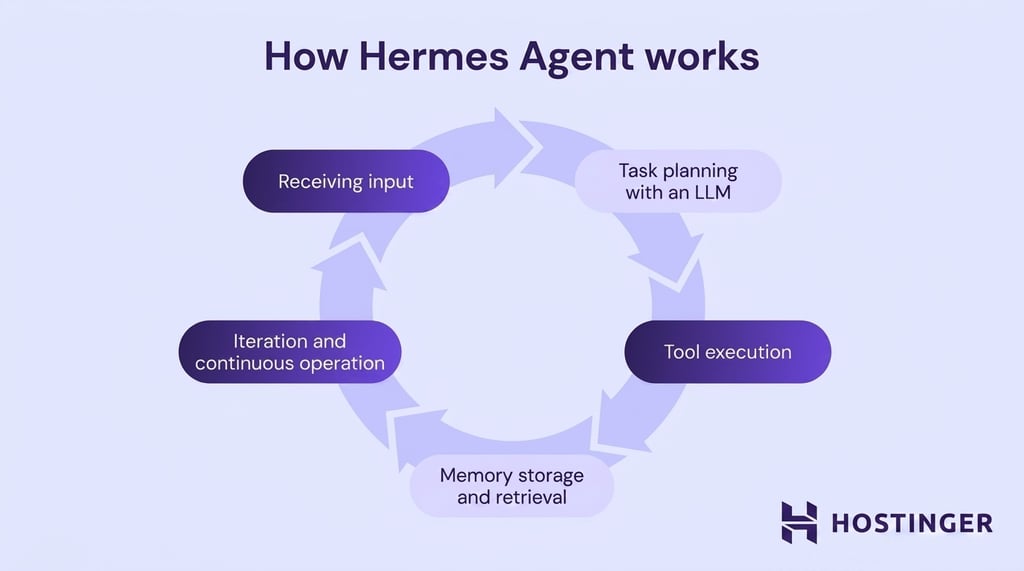
Hermes Agent runs in a managed or self-hosted environment, receives input, plans the next step with a language model, executes tools, stores results in memory, and repeats the process until the task is complete.
With Hermes Agent on Hostinger’s AI automation apps plan, Hostinger prepares and maintains the environment for you. For a self-hosted Hermes setup, you can deploy Hermes on your own infrastructure using the installer, which creates a Python environment and stores the agent’s files in ~/.hermes/.
From there, the Hermes Agent workflow looks like this:
- Receiving input. A task reaches the agent through the CLI, a connected messaging platform, or a scheduled cron job.
- Task planning with an LLM. The agent sends the request to the configured language model while considering its current memory and available tools. The model decides the next step.
- Tool execution. The agent calls the tools it needs, such as a terminal, file editor, web browser, or MCP servers, to carry out the plan. Each tool’s output feeds back into the loop.
- Memory storage and retrieval. The agent writes results, facts, and reasoning to a local database. When relevant, it also stores curated memory files so future sessions can build on them.
- Iteration and continuous operation. The loop repeats until the task is complete. The agent then waits for the next trigger without shutting down.
Together, these steps form a persistent loop that continues across tasks, platforms, and sessions.
What makes Hermes Agent different from other AI agents
Hermes Agent is a standalone, persistent AI agent that runs continuously, acts autonomously, and improves over time.
It ships with memory, skills, messaging, and scheduling already included, so you don’t have to build everything from scratch. You can still swap the LLM, add tools, or customize its behavior through a SOUL.md file.
Then, after a task is done, Hermes Agent captures the work, turning complex tasks into reusable skills that future runs can build on.
For instance, if you ask it to debug a failing deployment and it works through the fix across several steps, it writes that process down as a skill. The next time a similar deployment issue comes up, it already knows what worked.
This is a category that most AI tools don’t fit into, as they often fall into one of three buckets: chatbots that answer one question at a time, IDE assistants scoped to your editor, or orchestration frameworks like LangChain that give you building blocks but leave memory, scheduling, and the learning loop up to you.
Hermes Agent vs. OpenClaw
Hermes Agent and OpenClaw are both autonomous AI agents available as managed or self-hosted applications, but they take different approaches.
Hermes focuses on a learning loop that creates reusable skills, while OpenClaw focuses on direct, conversational task execution through connected apps and tools.
See the table below for a more detailed comparison of Hermes Agent and OpenClaw.
| Aspect | Hermes Agent | OpenClaw |
| Core focus | Self-improvement through autonomous skill creation | Direct task execution through natural language |
| Memory model | Four-tier memory, prompt files, SQLite archive, skills, and external providers | Long-term conversational memory |
| Persistence | Continuous loop with scheduled tasks and cron support | Always-on assistant |
| Autonomy | Plans, executes, and writes its own skill documents | Interprets intent, then acts on your infrastructure |
| Hosting model | Managed service, local device, private server, or serverless backend | Managed service, local device, Raspberry Pi, or private server |
If you’re moving from a self-hosted OpenClaw installation, Hermes can import much of your existing configuration and user data.
Simply run this command to import your settings, memories, skills, and API keys during the initial setup:
hermes claw migrate
This imports the supported settings, memories, skills, messaging configurations, and selected API keys, reducing the amount of manual setup required.
Hermes Agent vs. Paperclip
Hermes Agent and Paperclip operate at different layers, so they work better as complements than direct competitors.
In practice, Hermes is the agent you interact with daily. Paperclip is the orchestration layer you use when a task requires multiple agents to coordinate.
That means you can run a Hermes Agent instance as a worker inside a Paperclip organization.
| Aspect | Hermes Agent | Paperclip |
| Role | Single persistent agent | Orchestration platform for multiple agents |
| Unit of work | One agent with memory and skills | Multiple agents with defined roles, goals, and tasks |
| Structure | Personal AI that evolves over time | Organization-style hierarchy with governance |
| Best fit | Individual productivity, developer automation, and research | End-to-end workflows across agent teams |
| Interaction | Messaging apps, CLI, cron jobs | Dashboard, task system, shared context |
If you’re interested in building a full AI organization with Paperclip and Hermes Agent, follow our tutorial on setting up a Paperclip instance.
Key features of Hermes Agent
Hermes Agent combines features that many AI agents require separate tools or custom development to provide:
- Persistent execution. Hermes Agent can remain available for incoming messages, scheduled tasks, and long-running workflows. Managed setup keeps the application running for you once you set up your Managed Hermes instance, while self-hosted users can run it as a system service or persistent container that resumes after a reboot.
- Autonomous decision-making and skill creation. After successfully completing a complex task, finding a solution after failed attempts, or learning from a correction, Hermes can save the process as a reusable skill. Agent-created and imported skills are stored in ~/.hermes/skills/ and follow the agentskills.io standard. You can also add community skills and run them using commands such as /gif-search or /github-pr-workflow.
- Long-term memory retention. Hermes combines curated context files, searchable session history, and procedural skills to retain information across conversations. Files such as MEMORY.md and USER.md store important facts and preferences, while the SQLite database at ~/.hermes/state.db keeps previous sessions searchable. Optional memory providers such as Honcho, Mem0, OpenViking, and Supermemory can extend the built-in memory.
- Tool and API integration. Hermes provides tools for web search, terminal commands, file editing, browser automation, image and video analysis, media generation, scheduled tasks, and subagent delegation. Its tool registry is extensible, so developers can add custom tools and plugins without modifying the main agent code.
- Wide LLM compatibility. Hermes supports providers such as Nous Portal, OpenRouter, Anthropic, OpenAI, and Google. You can also connect custom OpenAI-compatible endpoints or run models locally through an Ollama instance.
- Built-in MCP support. Hermes can connect to MCP servers over stdio or HTTP to access external tools, databases, file systems, internal APIs, and other services. You can control which tools each server exposes through the agent’s configuration.
- Flexible deployment options. You can run Hermes Agent through Hostinger’s AI automation apps if you want Hostinger to handle the infrastructure, updates, backups, and security. For self-hosting, Hermes supports Linux, macOS on Apple silicon, native Windows, WSL2, and Docker, with Android available through Termux on a best-effort basis. It also provides six command-execution backends: local, Docker, SSH, Daytona, Singularity, and Modal.
Some interfaces, integrations, and configuration options may vary depending on whether you use a managed setup or run Hermes Agent on your own infrastructure.
What are the main use cases of Hermes Agent?
The main use cases of Hermes Agent include development automation, research and data analysis, scheduled workflows, and personal AI assistance. These use cases rely on persistent execution, where the agent maintains context over time and automates multi-step technical tasks without continuous user input.
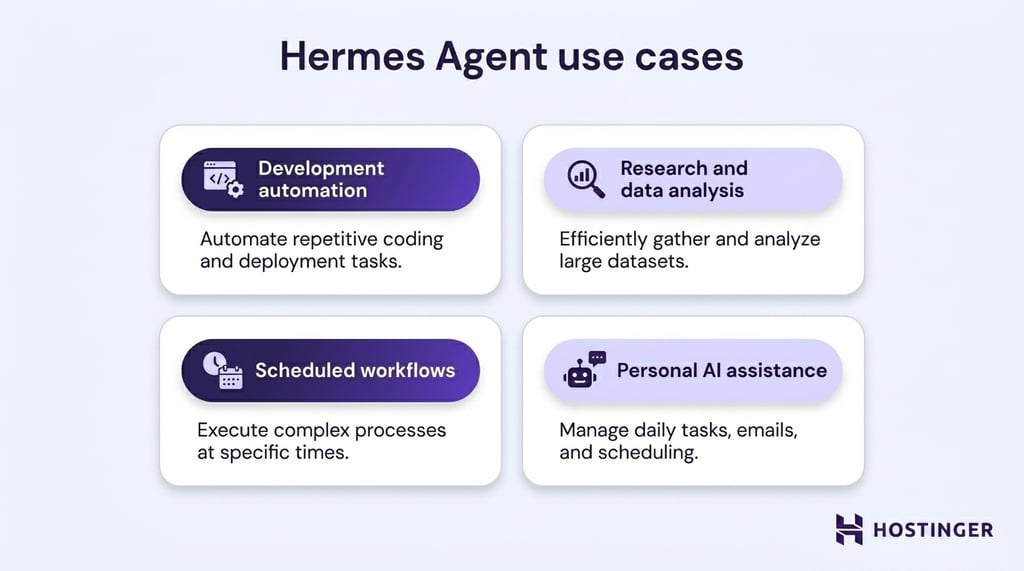
In a development environment, it can handle tasks such as reviewing pull requests, running tests, and managing long-running refactors, continuing work across sessions without losing context.
For research and data analysis, it combines browsing, code execution, and memory to gather, process, and revisit information over time.
It also supports scheduled workflows through built-in automation, such as recurring reports or updates delivered via messaging platforms like Telegram or Discord.
On a personal level, it can be a persistent assistant that adapts to your preferences, remembers your past work, and helps you streamline repetitive tasks.
Challenges and limitations of Hermes Agent
The main challenges and limitations of Hermes Agent are model reliability, security, resource usage, and the technical work required for self-hosting.
- Technical overhead. This mainly applies to self-hosted deployments. Running Hermes Agent on your own infrastructure requires familiarity with server administration, containers, or system services. A managed setup handles the server configuration, updates, backups, and infrastructure maintenance instead.
- Security risks. Giving an autonomous agent access to terminals, files, integrations, and API keys increases the potential impact of incorrect or malicious actions. Hermes includes safeguards such as command approvals, file-write controls, container isolation, and user allowlists. However, users should still limit permissions, protect credentials, and review sensitive actions.
- Resource consumption. Browser automation, parallel subagents, long conversations, and repeated tool calls can increase CPU, memory, and model usage. Self-hosted users may require a larger server, while managed users may incur additional AI or web search credits, increasing the cost of using Hermes Agent.
- Model limitations. Hermes Agent is only as reliable as its underlying model. Hallucinations, misunderstood tool output, and errors during multi-step tasks can still occur, especially with smaller models or complex workflows.
- Learning loop latency. Hermes doesn’t turn every completed task into a reusable skill immediately. Skill creation is most useful for repeatable workflows, so highly varied tasks may provide fewer opportunities for the agent to reuse what it has learned.
- Platform differences. Hermes supports Linux, macOS on Apple silicon, native Windows, WSL2, and Android through Termux. However, some features vary by platform. Android support is maintained on a best-effort basis, macOS on Intel processors isn’t supported, and certain Windows workflows work better through WSL2.
These limitations don’t make Hermes Agent unsuitable, but they affect which deployment method makes sense. Managed setup removes most server and maintenance responsibilities, while self-hosting provides greater control over the infrastructure. Both options still require you to choose a suitable model, manage tool permissions, and review high-impact actions.
How to get started with Hermes Agent?
To get started with Hermes Agent, first choose between a hosted setup and running it on your own infrastructure. Running Hermes Agent on Hostinger’s AI automation apps is the simpler route because Hostinger handles the server, updates, backups, and core security. Self-hosted Hermes takes more technical work but gives you direct control over the environment, models, tools, memory, and configuration.
The remaining setup is similar for both options. You’ll need to choose an AI provider and model, decide how you want to interact with the agent, and connect any messaging channels or tools your workflows require. Self-hosted users must also prepare the server, install Hermes Agent, and configure it to remain available after reboots.
Start with a simple conversation to confirm that the model and tools work correctly. Once the basic setup is stable, you can add messaging platforms, scheduled tasks, external memory providers, and more advanced automations by following our step-by-step guide to setting up Hermes Agent.
All of the tutorial content on this website is subject to Hostinger's rigorous editorial standards and values.

Ariffud is a Technical Content Writer with an educational background in Informatics. He has extensive expertise in Linux and VPS, authoring over 200 articles on server management and web development. Follow him on LinkedIn.

Larassatti Dharma is a content writer with 5+ years of experience in the web hosting industry. She has populated the internet with over 100 YouTube scripts and articles around web hosting, digital marketing, and email marketing. When she's not writing, Laras enjoys solo traveling around the globe or trying new recipes in her kitchen. Follow her on LinkedIn